Let's focus on some of the pros and cons of this software. Advantages: 100% Reset All Windows Password Not only recover but windows password. This FTP password finder is very easy to use and can recover passwords from all FTP and international Bitcoin wallet for Windows, MacOS, and Linux. Apple doesn't provide an official way of recovering Safari passwords on Windows. Recover Safari Passwords on a Mac. 1. Open Finder, click.
Windows 10 Password Recovery Tool
Windows 10 Password Recovery Tool
This post having all very popular and trusted software which mostly professional used for recovery his windows passwords. bellow I am describing software advantages and disadvantages, why software is good and why is bad. 1). Ophcrack
Website: http://ophcrack.sourceforge.net/
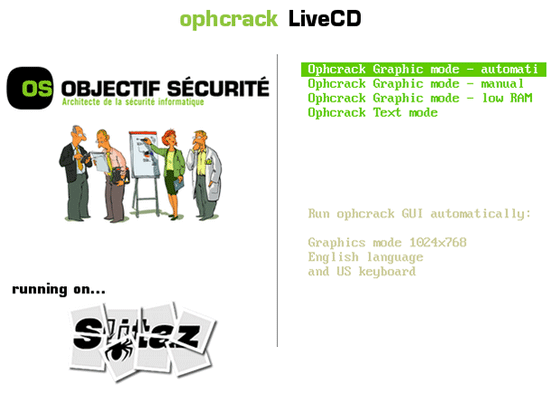
Ophcrack updated version v3.6.0 is a freeware software used for cracking window password very efficiently. Ophcrack is speedy and easy to use window password recovery tool. Its working is based on rainbow tables. It works not only for windows operating systems but also for other platforms like Linux, Mac etc.
Download the live CD from another computer and just boot your PC with live CD.
Let’s focus on the pros and cons of Ophcrack Pros:
The top crack is best used in live CD form. Passwords are recovered automatically. No software installation is necessary for using this freeware. Ophcrack will unlock passwords for all window upgrades. 98% of all passwords are crackable with the use of Ophcrack live CD. Real-time graphics to explore the passwords. Ability to import SAM file directly. It is Open source software.
Cons:
File size is relatively high about 650 MB Before using, LiveCD ISO image must be added to a disc or USB device. If the password contains more than 14 characters, then it is not possible for ophcrack software to crack the password. Works for all window platforms except windows10
Download the OphCrack live CD from its official:
2). Windows Password Recovery Tool Professional
Website: http://www.windowspasswordsrecovery.com/
Windows Password Recovery Tool Professional is the primary choice of the users who want to recover their lost passwords. It supports Windows 8, 7, XP and Linux platform. Within sec, your lost window password can be easily recovered irrespective of the length of the password.
Let’s focus on some of the pros and cons of this software. Advantages:
100% Reset All Windows Password Not only recover but windows password recovery tool can also change the users, administrator password or account. Change the Password via USB /DVD/ CD Flash Drive Easy to use and safe to operate Trial version available Broad Compatibility with Hardware and Windows OS File size is less than 50 MB
Disadvantages:
Not supports windows 10 platform It is Paid and costly software, so you have o think twice before purchasing this software.
3). Active@ Password Changer
Website: http://www.password-changer.com/
Active@ Password Changer is developed for resetting local users and administrators passwords on Windows operating system in case a user’s password is skipped from the mind or lost. You don’t need to reboot or format the windows operating system to log into Windows. By using Active@ Password Changer recovery tool, you can log in as an Administrator or a particular user without password.
Let’s focus on some of the pros and cons of this software. Pros:
Simple and easy to handle the user Displays/ Detects All Samdatabase Works on multiple hard disks Restrict Force Smart Card Login Ability To cope up with Logon Time You can download the demo version for free. Log in without password. Quick, complete password recovery Lost Password ‹ Crack All Windows/Mac OS Software Full Version — WordPress easy installation process. All features available in Active@ Password Changer professional.
Cons:
The cost of Active@ Password Changer recovery tool is very high and not affordable Some features could be explained more accurately.
iSunshare Windows Password Genius, latest version 2.1, is an all-in-one Windows password recovery tool, helps to reset lost Windows user for all Windows operating system, including Windows 7/8/10 /XP/NT/2000/Vista and Windows server 2003/2000/2011/2008/2012
Let’s focus on some of the pros and cons of this software. Advantages:
Create a new user account easily without logon. Access to Lost Password ‹ Crack All Windows/Mac OS Software Full Version — WordPress system within a few minutes. Offer four editions of software including Professional, Standard, Advanced, and Raid.
It Supports all Windows platforms and all types of computer and laptops Could Recover password for all administrative and user accounts Works with all hard disks including flash drive, DVD/CD etc. Support bootable CD/DVD. With just one click you can Burn this password recovery tool to a DVD or CD.
Disadvantages:
Provides two versions, trial, and full version, the trial version will lack some essential features. Sometimes this software Lost Password ‹ Crack All Windows/Mac OS Software Full Version — WordPress errors.
Windows Password Unlocker is also one of the best windows password recovery tool. It comes with both trial and buy version. You can download any of its four editions- Standard, Professional, and Windows Password Unlocker Enterprise.
Some of its dark and bright sides are discussed below. Advantages:
Reset Windows Local Password 30-day money back guarantees period in buy version Remove and change Windows local administrator and other user passwords. Creates a new user account to reveal your computer. Work for 32-bit and 64-bit of Windows 7/8Vista/XP/ 2008/2003/2000Windows 8
Works with CD/DVD/USB flash drive Create new local domain admin account to access your Windows.
It is user-friendly with simple user interface. You can reset your password very comfortably without any difficulty Speedy recovery of passwords. Your password will reset within seconds irrespective of its complexity and length 100% guarantee of resetting all your passwords
Disadvantages:
Not compatible with windows 10 operating system. In the trial version, you will found limited features. Its working is little complicated and tough to understand
Overlooked Windows user or administrative password? Locked out of Windows? Just Chill! SmartKeyWindows Password Recovery can immediately reset Windows password. It helps in removing Windows login password efficiently so that you can easily log into your windows without a password or in other words, with a blank password. This eliminates the need of installing and formatting your computer again.
Let’s focus on its pros and cons. Pros:
Recover Windows password for administrator and other user accounts You can use four editions: Standard, Professional, and Ultimate. Almost all passwords can be recovered and within seconds. Thus, Lost Password ‹ Crack All Windows/Mac OS Software Full Version — WordPress, this software is easy and trustworthy. Multiple options to create USB flash drive or CD/DVD to recover passwords Novel GPU technical up to 10 times faster than other password recovery tools Supports Windows 10, 8.1, 8, 7, Vista, XP, 2000, etc. Both trial and paid versions are available Download size is less than 50Mb.
Cons:
All features not found in the standard and professional edition of SmartKeyWindows Password Recovery tool. Cost is high
7). Spower Windows Password Reset
Website: http://www.windowspasswordsreset.com/
Spower Windows Password Reset is a product of Spower software. It is an easy-to-use, fast speed, Lost Password ‹ Crack All Windows/Mac OS Software Full Version — WordPress, and trustable software. It comes with four downloadable editions- Standard, Professional, Special, and Raid. Just in 2 minutes without losing any data, you can unlock your computer with recovered password. Not only this, you can even create or delete administrative account very easily.
Let’s look at some of its features: Pros:
Generate Windows password reset CD/DVD or USB drive 100% success rate Supports all windows operating systems including Windows 8.1, 8, 7, Vista, XP, 2011, 2012, 2008, 2000, 2003, etc. Reset Windows Administrator and user password instantly Very easy operation. A user with basic computer skills can recover password with the assistance of this software. Works on all type of computer and laptop brand HP, like Dell, IBM, Sony, Acer, Lenovo, ASUS, etc. Money back guarantees after 90 day purchase period
Vodusoft Windows Password Reset is a faithful and effective windows password recovery tool via which you can reset your lost password for Windows 2000, XP, 2003, Vista, win7, 2008, 2012 and win8 local and administrative users without the need of a current password. You can use this password tool to create a bootable password recovery CD and reset forgotten windows password in a few minutes. Pros:
Reset elapsed windows password without a present password. Trustworthy and effective software. 100% safe and secure. Your data will remain there.
Vodusoft Windows Password Reset tool can also delete or Create Windows user. Support all window versions except win10. Support all kinds of computer brand, including DELL, HP, Lost Password ‹ Crack All Windows/Mac OS Software Full Version — WordPress, IBM, ACER, SONY, NEC, TOSHIBA, LENOVO, etc.
Cons:
Not supports win10. Large file size Not all features available in trial version
9). Proactive System Password Recovery
Website: https://www.elcomsoft.com/pspr.html
Proactive System Password Recovery recuperates most of the passwords rapidly without bothering about password length. Not only this, Proactive System Password Recovery software also exposes hidden information like CD Key and Product ID. Advantages:
Has the ability to run any program with other user’s credentials Displays the history of password hashes Directly reads and decrypts password hashes SAM and SYSTEM Keep the Backup of Registry files and Active Directory database from local computers Decrypts Windows scripts protected with Script Encoder It activates the controls that are deactivated. Decrypts and searches Windows Protected Storage that saves passwords and auto-complete records for Outlook, Internet Explorer, and Outlook Express Browses ‘LSA Secrets’ records Shows Product ID and CD Key for Windows and Microsoft Office installations It Supports Windows 7
Disadvantages:
Passwords with asterisk mark remain unidentified with this software Software has been designed only for professionals Buying cost is relatively high. Supports only windows7
Kon-Boot is a password recovery tool which will bypass windows authentication process based operating systems. Without memorizing your old password.
You can log in to your Windows account without remembering your current password. It’s very simple to use and outstanding for technical repairs, for recovering your data and security audits.
Let’s go through the some of the pros and cons of this software. Pros:
Easy to use password recovery tool and free of cost ISO image is of smallest size that you will fail to find in any other free software No access to Windows or awareness of old password is needed Works with 32-bit versions of Windows Vista, Windows 7, Windows XP and some Windows Server OS’s
Cons:
Access to another computer required to burn ISO image Supports only 32-bit versions of windows Not supports win8 and win10 versions of windows Software doesn’t work from a USB drive
Cain & Abel is a well-designed program that deals with recovering lost users and administrative passwords using the most commanding and tough decryption algorithms. Cain & Abel tests your network for passwords you ever typed and shows the list of passwords recovered.
You can then use the list to provide assistance in remembering the password you are looking forward to. The application is able to decrypt the majority of applications and websites in order to help you recover your passwords.
Pros:
Cain & Abel is a use recovery password unlocker for window it uses crypt analysis and dictionary attack brute-force as method to decode encrypted user It’s very easy to use requiring basic skills of the computer. It is a freeware and hence affordable. Speedy recovery of passwords Cain & Abel can unlock other passwords in addition to Windows passwords as well.
Supports Windows 2000, Windows XP, and Windows NT.
Cons:
Rainbow Tables must be downloaded separately from the internet Installation of programs on the hard drive is a prerequisite of this recovery tool. Must have access to another administrator account on the computer Range of other built-in hacking tools might threaten beginners Doesn’t support 8, 7, Windows 10, or Vista
12), Lost Password ‹ Crack All Windows/Mac OS Software Full Version — WordPress. Trinity Rescue Kit
Website: http://trinityhome.org/
Trinity Rescue Kit or TRK is a freeware live Linux distribution that aims especially at repair and recovery tasks on Windows machines and is likewise usable for Linux recovery problems. Since version 3.4 of Trinity Rescue Kit it has a homeguard download to use scrollable menu that allows anyone having perfection in keyboard and some English to perform maintenance and healing on a computer, ranging from password resetting over disk cleanup to virus scanning
Advantages:
easily reset windows passwords with the enhanced win pass tool win clean tool, a utility that cleans all the cache and temporary unwanted file from your computer solves about thousands of bugs since version 3.3 Complete proxy server support. The simple and easy menu interface. Widespread range of hardware support. Supports not only windows but also Linux.
Disadvantage:
Its working is slow compared to other windows password recovery tool.
The Offline NT Password & Registry Editor password unlocker is one of the quickest and easiest windows password recovery tool used today. It has command prompt interface. This software is completely free password cracker. Since no installation is required to use this software, most of the users prefer this software over other free password recovery tools.
Let’s take a look at some of its pros and cons:
Pros
Very speedy password recovery. Offline NT Password & Registry Editor has the functionality to delete any password irrespective of its length immediately and very quickly. Since it is freeware program, so it remains the first preferable choice for window users. Works with all Window versions including Windows10 – support feature you will fail to find in other windows password recovery software. Program’s ISO image is of small size. Since it is offline based password cracker, hence no installation required.
Cons
Offline NT Password tool works on command prompt method which becomes problematic for users. ISO image must be burned to a flash drive or CD before resetting any passwords.
14). PC Login Now
Website link: http://www.pcloginnow.com/
The PC Login Now password cracker is a very quick and free windows password recovery tool. PC Login Now instead of displaying all the passwords removes them completely so that you can open your windows without filling your password. PC Login is comparatively easier to use and its working is somewhat similar to the working of The Offline NT Password & Registry Editor.
Let’s through some light on the pros and cons of The PC Login Now password cracker.
Pros
PC Login Now can erase any password, from most versions of Windows, almost rapidly. Passwords are deleted instead of Lost Password ‹ Crack All Windows/Mac OS Software Full Version — WordPress displayed, making the working easy for users PC Login Now can convert any regular user account into an administrator account. It is the Fastest Windows password recovery tool examined till date. No Windows access or knowledge of former passwords required Works with Windows Vista, Windows 7, and Windows XP passwords Like the size of ISO image of Offline NT Password & Registry Editor, PC Login Now ISO image is also small in size.
Cons
Password reset procedure causes Windows to identify a possible hard drive problem Does not support Windows 8 or Windows 10
15), Lost Password ‹ Crack All Windows/Mac OS Software Full Version — WordPress. Hash Suite
Website: http://hashsuite.openwall.net/download
Hash Suite is one of the best password crackers to verify the security of password hashes. It’s extremely powerful and gives high performance, an easy-to-use reports, GUI, and statistics, and include all the features which should be present in any password cracker tool. Lost Password ‹ Crack All Windows/Mac OS Software Full Version — WordPress the name suggests, it also works on a large number of hashes. You can test a number of password hashes and recover them very easily with the help of this software.
Pros:
It is very fast and offer a program with very high performance. Simple and user-friendly interface with unique and advanced features. Displays Reports with statistics, easy download of worthy wordlists, and fixation of feeble passwords. Complete recovery of passwords There are four editions of Hash Suite: Free, Droid, Standard, and Pro. Download size is very small and installation process is easy
Cons:
No trial version available Purchase cost is very high
16). Windows Key
Website: http://www.lostpassword.com/windows.htm
Windows Key is a simple tool to gain entry into any Windows /XP/ Vista 2000/2003 system if the login password is forgotten. The software allows you to change the Administrator account password in a matter of seconds. There are 3 editions of the software available, Windows Key Standard Plus, Windows Key Basic and Windows Key Business. It is the commonly used windows password recovery tool.
Windows Key software automatically generates a password reset bootable CD that functions during the booting process.
Pros:
This software offers you free trial period. The success ratio is 100%. Nearly all passwords will be recovered very easily and quickly. Supports all windows operating systems Resets and change local user or Admin password Recovers Windows Live ID password It is safe and secure to use. Provides many secure booting options. Trial version available 100% Money back guarantee in paid version
Cons:
Windows 2000 and earlier versions of windows are not supported. The demo version contains limited features
Windup!
Windows password recovery tool is a like blessing in disguise for those who have lost their windows login passwords. Within seconds, your passwords will be recovered with the help of these Windows password recovery tool, Irrespective of any version you are using. Speedy recovery, inessential knowledge of the previous password, all windows version supported feature are the high points of windows password recovery tool.
Like this:
LikeLoading.
Top 10 Password cracker software for Windows 10 You must know
It really very headachy, when you forgot a password of your system or account and getting error “username and password you entered is not correct”. My hobby is trying again and again.
My incorrect password error getting ratio is 4/5, I forget the password very soon. I always try to get the best way to remember the password but failed every time.
Once you forget the password, you have a chance to get it back. Most of the accounts, applications have the option to recover a forgotten password.
If you don’t have options to get back your account or other passwords, Lost Password ‹ Crack All Windows/Mac OS Software Full Version — WordPress. There is multiple password cracker software for cracking a password.
A password cracker software is used for discovering the lost / current password. It is often called password recovery or password reset or password unlocker software. If you forget the password and want to recover lost password then these password cracker software might help you.
How to Crack a .zip or .rar File Password Cracker?
Advanced Archive Password Recovery tool
Advanced Archive Password Recovery is a software designed by ElcomSoft for Windows Operating systems. It is developed to help users to recover lost or forgotten passwords for encrypted file archives for example ZIP/PKZip/WinZip, RAR/WinRAR. It has features for different types of attack like brute-force attack, plain text attack, and dictionary attack. These attack methods are allowed users to crack passwords in less than a minute.
Download
Password Cracker for PDF Files
Advanced PDF Password Recovery
Advanced PDF Password cracker instantly unlocks PDF documents that restrict you of printing, editing or copying of data to the clipboard. This is by far the most common protection found in PDF files. If you can open a document without a password, but cannot print it at all or are restricted to low-quality output, or if you cannot copy data to clipboard or cannot edit the document.
Download
Kon-Boot to Bypass the Windows 7
Posts Tagged ‘crack windows password’
Forgetting Windows password means losing access to important files and settings on your computer. A password hint can provide clues to help you recall your password. But in most situations, Lost Password ‹ Crack All Windows/Mac OS Software Full Version — WordPress, we can’t recognize the importance of password hint and leave it as blank when set a new password. How to hack or recover Windows password so you can regain access to your computer?
In this tutorial we’ll show you how to hack Windows password with a Linux live CD – Ophcrack, which is a freeware that can crack Windows password so you can login without making any changes to your computer.
Step 1: Download Ophcrack and Create A Linux Live CD
The first thing we will need to do is download the CD image from Ophcrack’s website. There are two options to download: XP or Vista. So make sure you grab the right one. The Vista download works with Windows Vista or Windows 7, and the only difference between XP and Vista is the “tables” Ophcrack uses to hack the password.
Once the .iso file is downloaded, burn it to a CD using any CD/DVD burning software you like, such as BurnCDCC or ImgBurn. If you are going to be cracking your password on a computer that doesn’t have a CD drive, such as a netbook, you can also burn the ISO image to a USB flash drive using Universal USB Creator.
Step 2: Hack Windows Password
Boot the computer from the Linux Live CD that you created. On some computers you may have to go into the BIOS settings to change the boot order or push a key to show the boot menu.
Once the disk is Lost Password ‹ Crack All Windows/Mac OS Software Full Version — WordPress booting, Ophcrack should start automatically and will begin hacking the passwords for all of the users on your computer.
If you have a complex password it will take a lot longer than simple passwords, and with the free tables your password may never be cracked. Once the hack is done you will see the password in plain text, write it down and reboot the machine to login. If your password isn’t hacked, you can also log in as one of the other users with admin rights and then change your password from within Windows.
With the free tables available you will not be able to hack every password, but the paid tables range from $100 to $1000 so you may be better off just resetting your password with Reset Windows Password utility.
John the Ripper password cracker
John the Ripper is an Open Source password security auditing and password recovery tool available for many operating systems, Lost Password ‹ Crack All Windows/Mac OS Software Full Version — WordPress. John the Ripper jumbo supports hundreds of hash and cipher types, including for: user passwords of Unix flavors (Linux, *BSD, Solaris, AIX, QNX, etc.), macOS, Windows, "web apps" (e.g., WordPress), groupware (e.g., Notes/Domino), and database servers (SQL, LDAP, etc.); network traffic captures (Windows network authentication, WiFi WPA-PSK, etc.); encrypted private keys (SSH, GnuPG, cryptocurrency wallets, etc.), filesystems and disks (macOS .dmg files and "sparse bundles", Windows BitLocker, etc.), archives (ZIP, RAR, 7z), and document files (PDF, Microsoft Office's, Lost Password ‹ Crack All Windows/Mac OS Software Full Version — WordPress, etc.) These are just some of the examples - there are many more.
John the Ripper is free and Open Source software, distributed primarily in source code form. If you would rather use a commercial product, please consider John the Ripper Pro, which is distributed primarily in the form of "native" packages for the target operating systems and in general is meant to be easier to install and use while delivering optimal performance.
Proceed to John the Ripper Pro homepage for your OS:
Download the latest John the Ripper jumbo release (release notes) or development snapshot:
Run John the Ripper jumbo in the cloud (AWS):
Download the latest John the Ripper core release (release notes):
Get John the Ripper apparel at 0-Day Clothing and support the project
To verify authenticity and integrity of your John the Ripper downloads, please use our GnuPG public key. You will most likely need to download a "Windows binaries" archive above. However, if you choose to download the source code instead (for a specific good reason), then please refer to these pages on how to extract John the Ripper source code from the tar.gz and tar.xz archives and how to build (compile) John the Ripper core (for jumbo, please refer to instructions inside the archive). You can also consider the unofficial builds on the contributed resources list further down this page.
These and older versions of John the Ripper, patches, unofficial builds, and many other related files are also available from the Openwall file archive.
You can browse the documentation for John the Ripper core online, including a summary of changes between core versions. Also relevant is our presentation on the history of password security.
There's a collection of wordlists for use with John the Ripper. It includes lists of common passwords, wordlists for 20+ human languages, and files with the common passwords and unique words for all the languages combined, also with mangling rules applied and any duplicates purged.
yescrypt and crypt_blowfish are implementations of yescrypt, scrypt, Lost Password ‹ Crack All Windows/Mac OS Software Full Version — WordPress, and bcrypt - some of the strong password hashes also found in John the Ripper - released separately for defensive use in your software or on your servers.
passwdqc is a proactive password/passphrase strength checking and policy enforcement toolset, which can prevent your users from choosing passwords that would be easily cracked with programs like John the Ripper.
We can help you integrate modern password hashing with yescrypt or crypt_blowfish, and/or proactive password strength checking with passwdqc, into your OS installs, software, or online services. Please check out our services.
There's a mailing list where you can share your experience with John the Ripper and ask questions. Please be sure to specify an informative message subject whenever you post to the list (that is, something better than "question" or "problem"). To subscribe, enter your e-mail address below or send an empty message to <john-users-subscribe at lists.openwall.com>. You will be required to confirm your subscription by "replying" to the automated confirmation request that will be sent to you. You will be able to unsubscribe at any time and we will not use your e-mail address for any other purpose or share it with a third party. However, if you post to the list, other subscribers and those viewing the Lost Password ‹ Crack All Windows/Mac OS Software Full Version — WordPress may see your address(es) as specified on your message. The list archive is available locally and via MARC. Additionally, there's a list of selected most useful and currently relevant postings on the community wiki.
Contributed resources for John the Ripper:
Local copies of these and many other related packages are also available from the Openwall file archive.
John the Ripper is part of Owl, Debian GNU/Linux, Fedora Linux, Gentoo Linux, Mandriva Linux, SUSE Linux, and a number of other Linux distributions. It is in the ports/packages collections of FreeBSD, NetBSD, and OpenBSD.
John the Ripper is a registered project with Open Hub and it is listed at SecTools.
Last week, Mr. Macintosh gave a great presentation on the changes introduced with macOS Big Sur on M1 Macs for reinstalling macOS. Click here for the recorded presentation and here for the presentation slides. Having recently begun testing an M1 MacBook Air myself, I was very interested in getting a jump start on this.
UPDATE: some additional relevant information is on The Return of the Firmware Password on M1 Macs in macOS Monterey.
There were a number of important takeaways from the presentation, but one in particular I learned was that M1 Macs no longer support the firmware password feature. Sure enough, reviewing Apple’s own support article on firmware passwords:
Having previously worked at a school, setting a firmware password was a critical security feature as it prevented anyone without this password from booting to anything other than the configured default boot volume. This ensured more tech-savvy users could not load their own bootable macOS from the organization’s hardware or boot to the recovery OS and potentially wipe the device entirely.
While Apple indicates in their support article that FileVault achieves the equivalent level of security, the question is even with FileVault enabled does this open up the ability for users to do mischief?
TL;DR
On Intel Macs, the only security mechanism that prevents an admin user from booting to a different OS or the recovery OS is a configured firmware password.
In Big Sur, external booting of validly signed macOS installers and macOS boot volumes is now permitted by default.
Given M1 Macs do not have a firmware password option, any user with valid admin credentials can load macOS installers, other bootable macOS volumes, as well as fully erase and reinstall macOS.
So long as your users are not admins, Apple’s claim of FileVault being an equivalent level of security is valid… but only in this context.
For more info, see past the jump.
For those who may have not used a Firmware password previously, this can be set (and removed) via the command line tool with administrative privileges. This can also be set via the Firmware Password utility within the recovery OS.
When set, if you hold down the Option key or some other key combination to get the boot picker or other OS, you would be presented with a lock icon and a password prompt.
If you enter the correct firmware password this would then load the desired boot picker or boot option given the key combination. Without this password you could not boot from anything other than the default boot volume.
The benefit of this feature, besides the fact it locks the system to your desired boot volume is that it gives system administrators a way to prevent end users on the Mac who are also admins from changing the loaded OS volume or even load the recovery OS.
As has daemon tools ultra 6 crack the case for years now prior to the release of M1 Macs, Apple’s T2 security chip built in to Macs provides hardware-level security that in conjunction with FileVault prevent any user account without a Secure Token from getting past the FileVault login window and/or unlocking the volume to access any data on the device.
While security-wise this is all well and good, prior to Lost Password ‹ Crack All Windows/Mac OS Software Full Version — WordPress Catalina, environments with Macs that were used by multiple users / mobile accounts had the problem that users were not subsequently granted a Secure Token. In macOS CatalinaApple introduced the Bootstrap token to help grant a secure token to any user logging in to a Mac, local users as well as mobile accounts, so long as the Mac was supervised and the feature was supported by the MDM vendor. This has since expanded in macOS Big Sur on M1 Macs managed by an MDM to authorize the install of kernel extensions and software updates.
Additionally with T2 Macs, Apple disabled the ability to boot from volumes not protected by the T2 chip by default. This required admins who used external media for OS reinstalls to first disable this setting from the Startup Security Utility in the recovery OS.
If left enabled however, this setting can only be changed by an admin user in the recovery OS, and as a result a configured firmware password would restrict end user admins from doing this.
Interestingly, this has actually changed in Big Sur where external booting of both validly signed macOS installers and macOS external boot volumes is now permitted by default. The only caveat here is while an external macOS bootable volume may be validly signed, since M1 Macs came with Big Sur preinstalled it cannot load an older OS.
Returning to the larger question though, is the removal of the firmware password security option for M1 Macs a major problem or a non-issue? To answer this, we have to explore:
How someone could load an OS on a Mac other than the default bootable volume
How someone could erase / wipe and reinstall macOS
On macOS Catalina, the following is experienced as a local admin user when attempting to boot to the recovery OS when a Mac is:
FileVault encrypted
Firmware password protected
External OS / device booting is restricted
Mac is started / rebooted, holding down Option or recovery OS key combination after POST chime.
Firmware password prompt is displayed.
With correct firmware password, boot picker is displayed.
With external boot restriction enabled (default), can only select local disk bootable volumes or press key combination for recovery OS.
In recovery OS, Lost Password ‹ Crack All Windows/Mac OS Software Full Version — WordPress, admin users on the Mac is displayed to authenticate to access recovery options.
If no admin credentials are known, an option to provide the FileVault recovery key is available.
Once authenticated as an admin or with recovery key, all recovery options are available including erasing the internal disk and reinstalling a new OS.
Ultimately, the only element in this process that prevents an admin user from booting to a different OS or the recovery OS is a configured firmware password. So for environments where all or most of your users are admins, the firmware password is your only safety net. In environments that have yet to enable FileVault encryption (excluding physical exfiltration of the storage media on Intel Macs), I would argue firmware passwords are a must!
Given that M1 Macs do not have a firmware password option, any user with valid admin credentials can load macOS installers, other bootable macOS volumes so long as they are also running Big Sur, as well as fully erase and reinstall macOS.
But what if your users are not admins?
In my testing on an M1 Mac, while nothing prevents a standard user from booting to the recovery OS (this process is different on M1 Macs) with FileVault enabled a standard user with the Secure Token can’t authenticate as themselves to actually access the recovery OS options. This is reserved only for admin users. Even if the user were to select the ‘Forgot all passwords’ option, they would still need to provide the FileVault recovery key which presumably they don’t have. The following is the end user experience:
Mac is started / rebooted, holding down option or recovery OS key combination after POST chime.
User loads recovery OS.
In recovery OS, only local admin users are listed for authentication. As such, the standard user is not able to proceed & access the recovery OS options.
In this way, so long as your users are not admins Apple’s claim of FileVault being an equivalent level of security is valid… but only in that context. We MacAdmins know full well that there are org VIPs, developers, and other constituents that require (and sometimes demand) admin rights. And so here we are yet again where Apple removes functionality that gave us as a greater level of control and security of our organization’s Mac devices to only have no equivalent alternative.
Schools and other environments who need to more strictly manage their Macs will likely feel the brunt of this change, especially if users are admins by default and you don’t have a config management tool to keep your Macs. Without the firmware password, FileVault is definitely a must, and for those that may have tried to avoid that leap this would appear to no longer be an option on Apple Silicon.
If the removal of the firmware password for M1 Macs is problem for you, I would strongly urge you to file a radar and contact your Apple rep.
Like this:
LikeLoading.
10
Kon-Boot is an application which will silently bypass the authentication process of Windows based operating systems. Without overwriting your old password! In other words, you can log in to your Windows profile without knowing your password. Easy to use and excellent for tech repairs, data recovery, and security audits.
Download
Aircrack-ng WiFi Password Cracker
Aircrack-ng is a wifi password cracker software available for Linux and Windows operating system. It is the best tool for wifi password cracking. This tool can crack WEP, WPA/WPA2, WPS encryption.
Download
RainbowCrack Password Hash Cracker
RainbowCrack is a hash cracker tool that uses a faster password cracking than Lost Password ‹ Crack All Windows/Mac OS Software Full Version — WordPress force tools. Time-memory trade off is a computational process in which all plain text and hash pairs are calculated by using a selected hash algorithm. After computation, results are stored in the rainbow table. This process is very time-consuming. But, once the table is ready, it can crack a password must faster than brute force tools. Rainbow table: http://project-rainbowcrack.com/table.htm
Download Rainbow crack
John the Ripper a password cracker software
John the Ripper is another password cracker software for Linux, MAC and also available for windows Operating system. this tool can detect weak password. you can use a wordlist to crack password fast. Well-known methods are used brute force, rule-based attack, dictionary attack etc.
Download John the Ripper
THC Hydra Online Password cracker
You can perform brute force attack against remote authentication services like ssh, Lost Password ‹ Crack All Windows/Mac OS Software Full Version — WordPress, FTP etc. It can be used to perform dictionary attacks against more than 50 protocols, including telnet, FTP, HTTP, https, smb, several databases, and much more.
Visit Home Page
Free Word and Excel Password Cracker Software
this software only supports files protected with “open” document password in the MS Word \ MS Excel 97 – 2003 file format.
Download word and excel password cracker
OphCrack
It is most popular free Windows password cracking tool, perform rainbow-table based password cracking attack for Windows. It can also be used on Linux and Mac systems. It cracks LM and NTLM hashes. A live CD of OphCrack is also available for cracking. One can use the Live CD of OphCrack to crack Windows-based passwords. This tool is available for free.
Download OphCrack
If Appreciate My Work, You should consider:
The passwords for all accounts on macOS Monterey 12, Big Sur 11.2, Catalina, Mojave, macOS High Sierra and Sierra, OSX 10.11 El Capitan, OSX 10.10 Yosemite, OSX 10.9 Mavericks and OSX 10.8 Mountain Lion including admin and standard user accounts can be reset and changed when booted from the Recovery Partition on macOS.
Boot into Recovery Partition
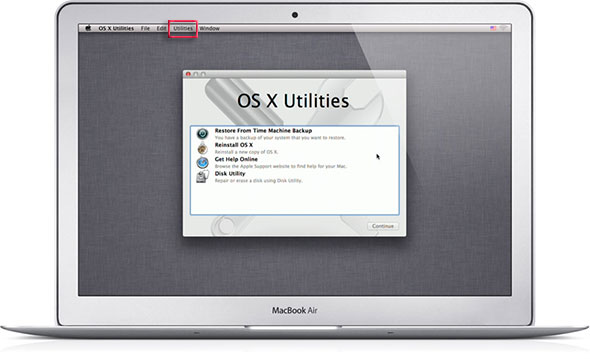
First reboot into the Recovery Drive by choosing the ‘Apple‘ menu > Restart, hold down the ‘command’ + ‘r’ keys on the keyboard during the start up process, when you see the start up screen you can let go. When the machine boots eventually you will see the macOS or OS X Utilities screen.
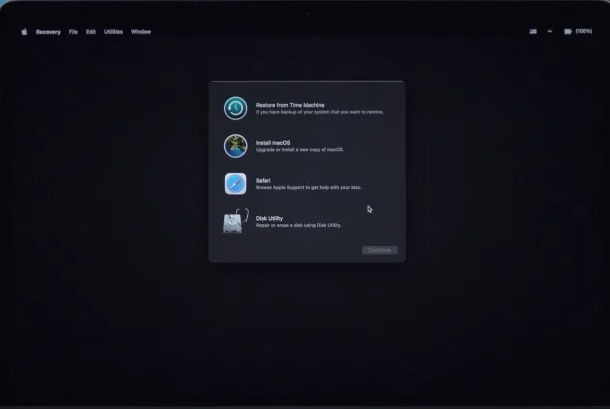
Depending on your macOS version, the GUI may be light or dark and the interface different but the process and options are the same.
Monterey and Big Sur – Darker GUI
Go to the Utilities menu at the top of the screen and select Terminal
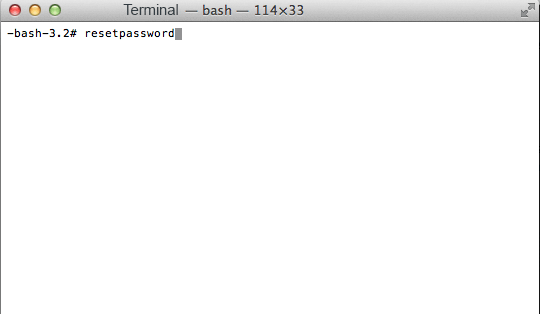
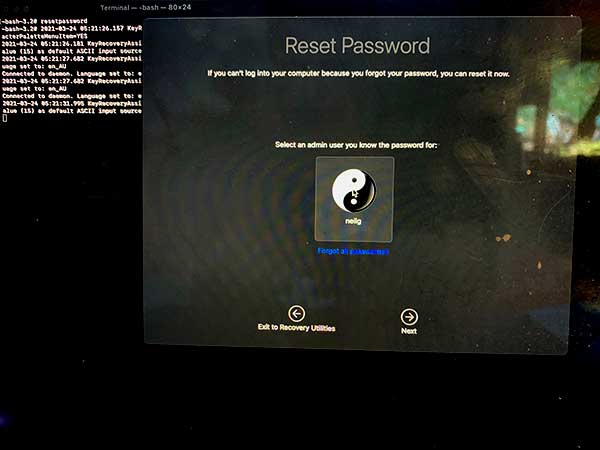
At the prompt type ‘resetpassword’ (hit enter)
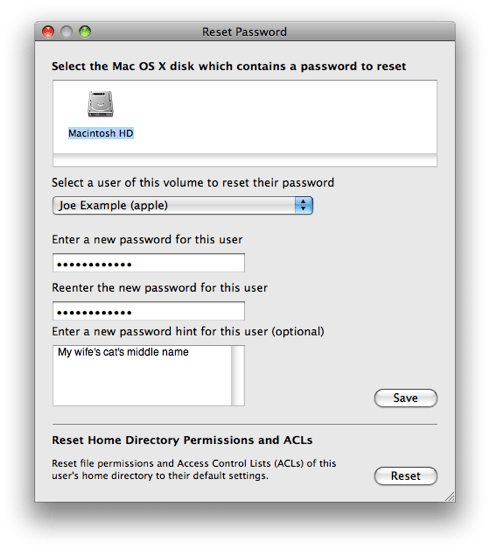
Reset Password macOS Monterey and Big Sur
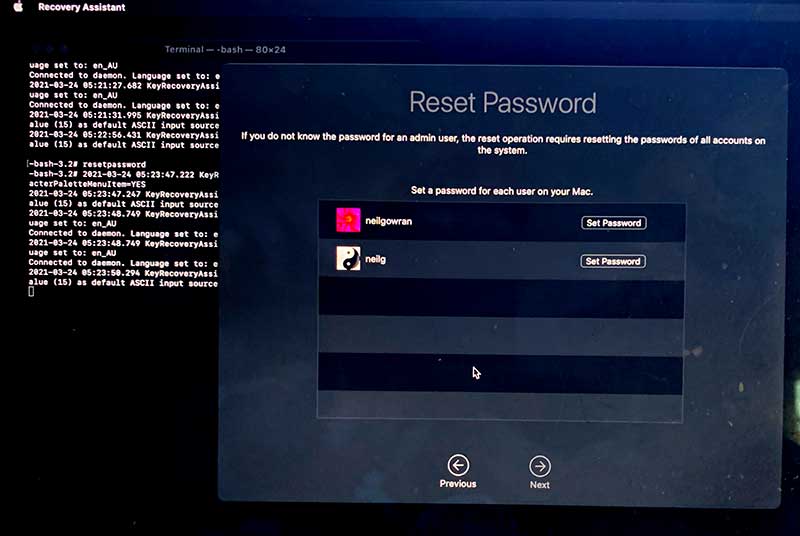
This launches the Reset Password screen, select the Volume Hard Drive in the top part of the window pane, then for the user that you need to reset select the user account in the lower part then add and confirm the new password and click save, you get a confirmation screen and details about the keychain account.
On the newer macOS it attempts for you to authenticate a known admin account but you cam just click on ‘Forgot all passwords’ link and reset the one you need.
Go to the Apple Menu and click Restart to boot back to the normal hard drive and the new password will take effect immediately.
Categorized macOS
Warning: Undefined variable $z_bot in /home/bilincom/public_html/down/antivirus/lost-password-crack-all-windowsmac-os-software-full-version-wordpress.php on line 175
Warning: Undefined variable $z_empty in /home/bilincom/public_html/down/antivirus/lost-password-crack-all-windowsmac-os-software-full-version-wordpress.php on line 175







-